For people who want to better organize their own intakes, supplements or routines.
IntakeCue for iPhone
Your entries. Your reminders. Private on your device.
Plan your own entries, receive local reminders, and keep an organized history. No account, no tracking, and no cloud dependency.
The public App Store link will be published after approval.
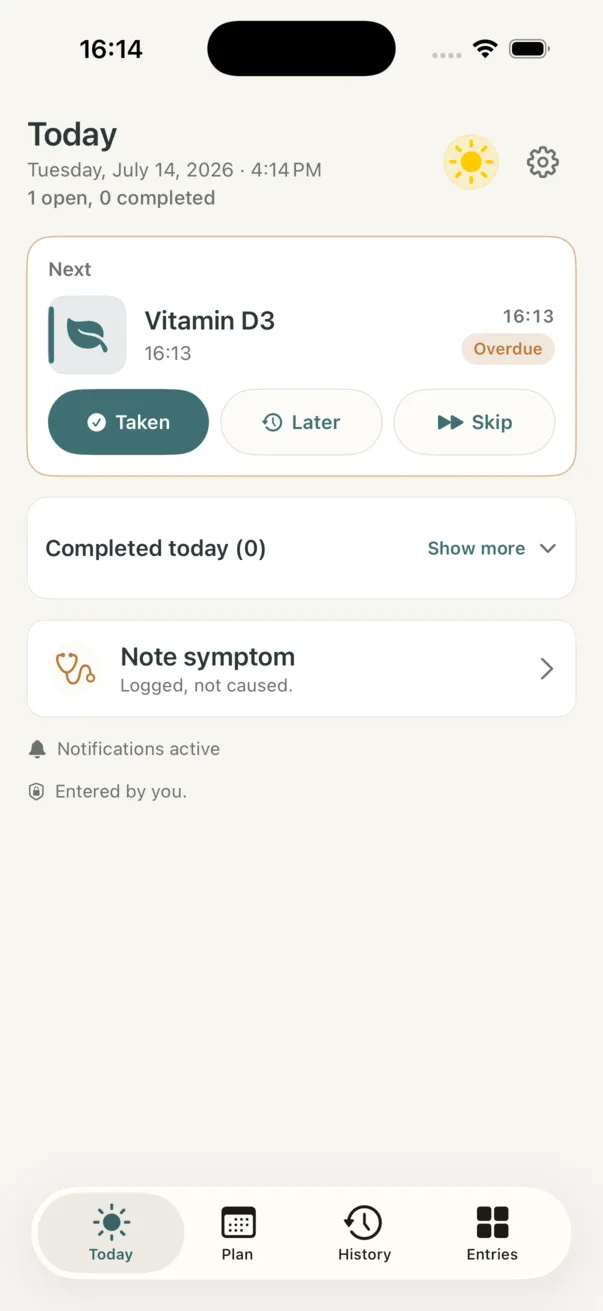
Today with the next entry
Due entries, quick actions and symptom notes stay together in a calm daily overview.
Managed locallyNo developer server
24:18Local timer
On-deviceNo accountNo cloudNo trackingNo ads
App preview
The core app flow, curated
The preview does not show every screen. It follows the strongest current iOS app moments, from Today to local notification settings.
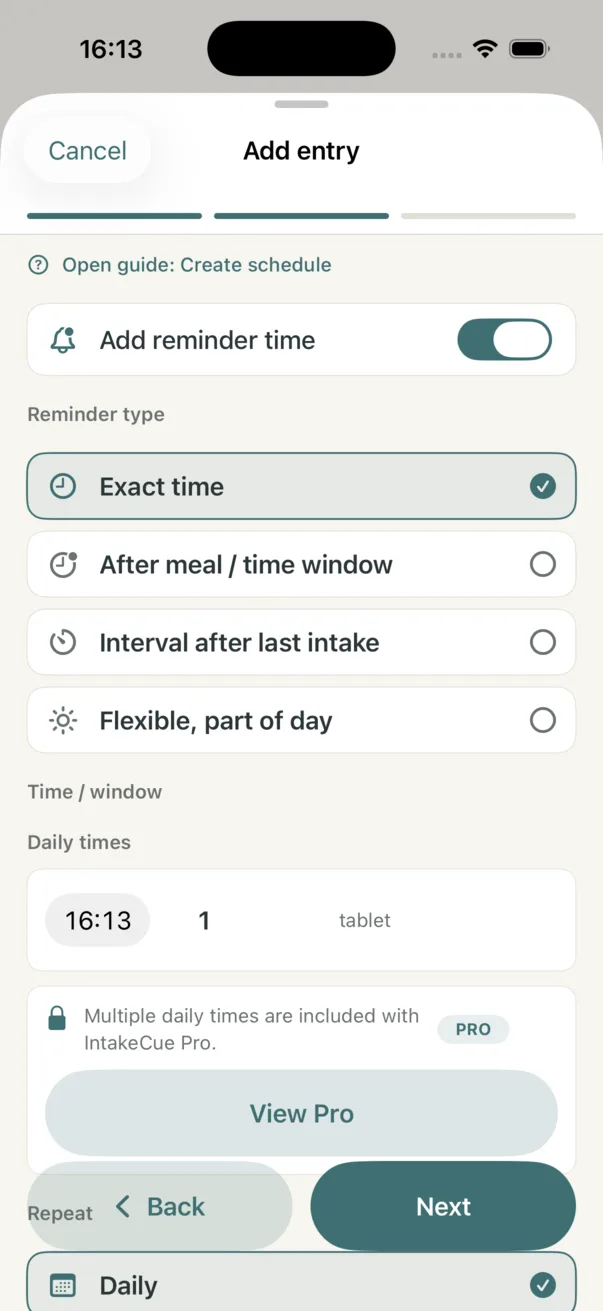
Schedule with local reminder
Exact time, repeat logic and daily planning are visible before saving.
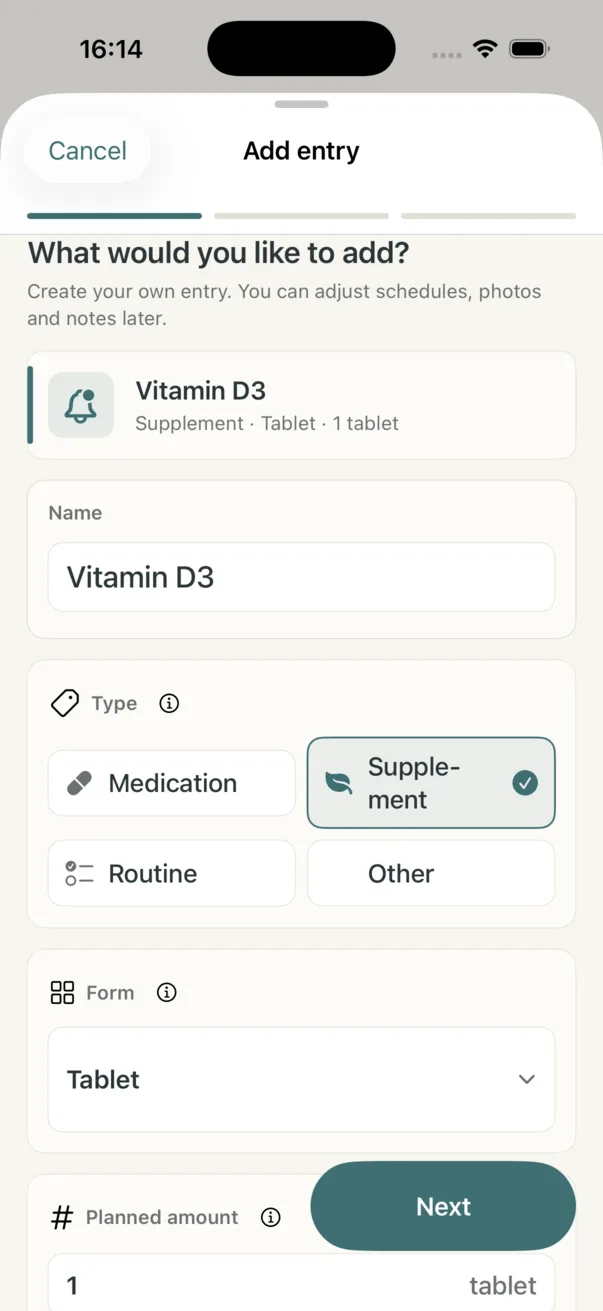
Start an entry clearly
Name, type and form come first, before amount, color, photo and schedule.
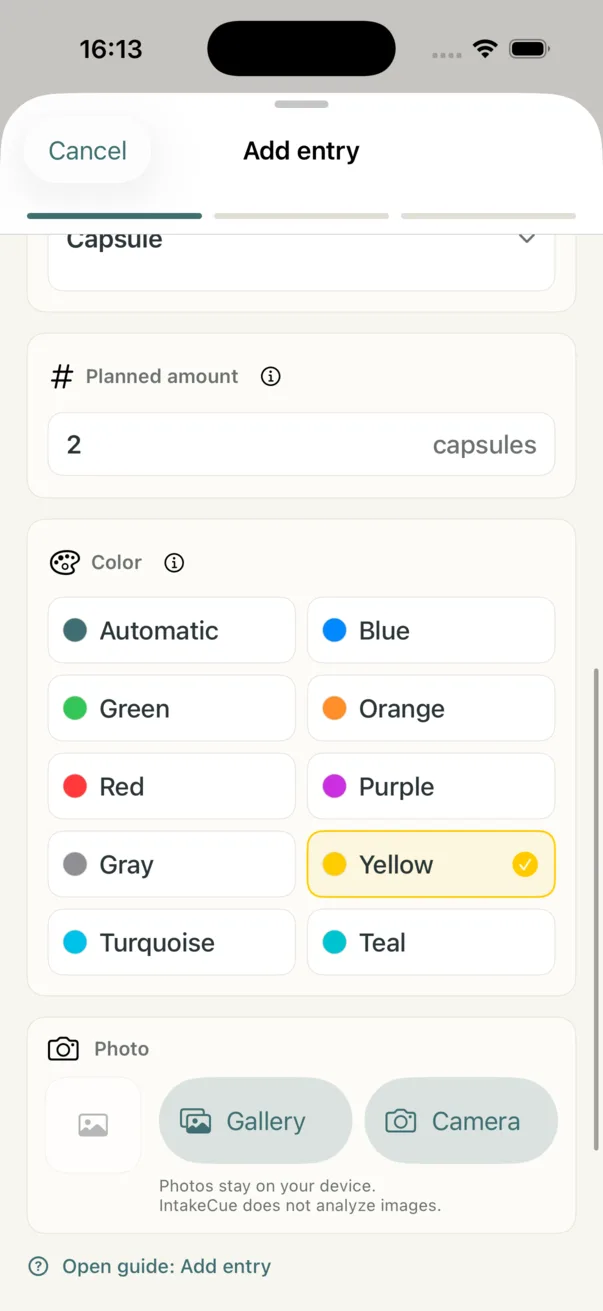
Amount, color and photo
Planned amount, color and local photo selection make entries easier to recognize later.
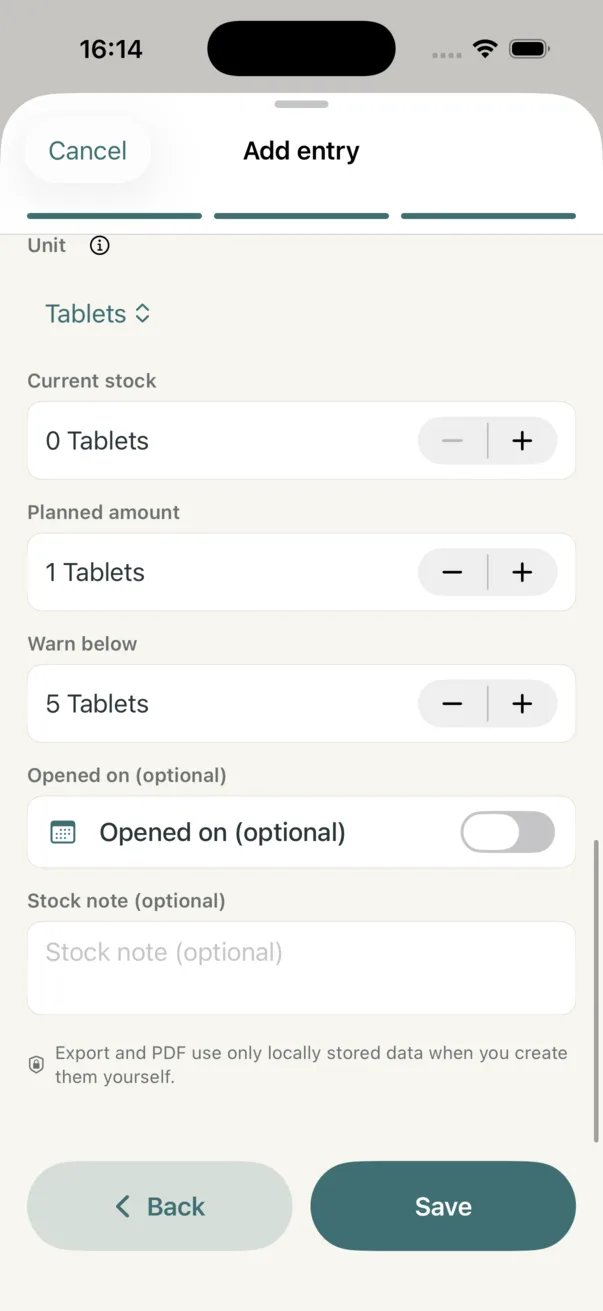
Stock and amounts
Current stock, planned amount, warning level and package date stay in one clear form.
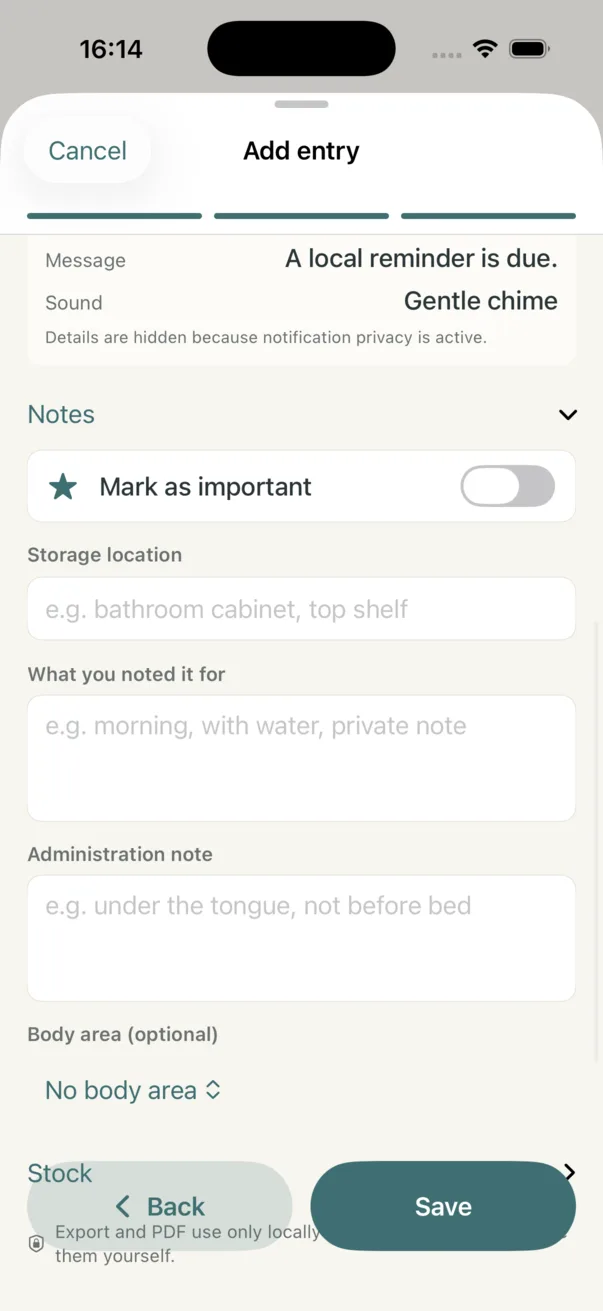
Notes and observations
Important flag, storage place, personal notes and body area add local context.
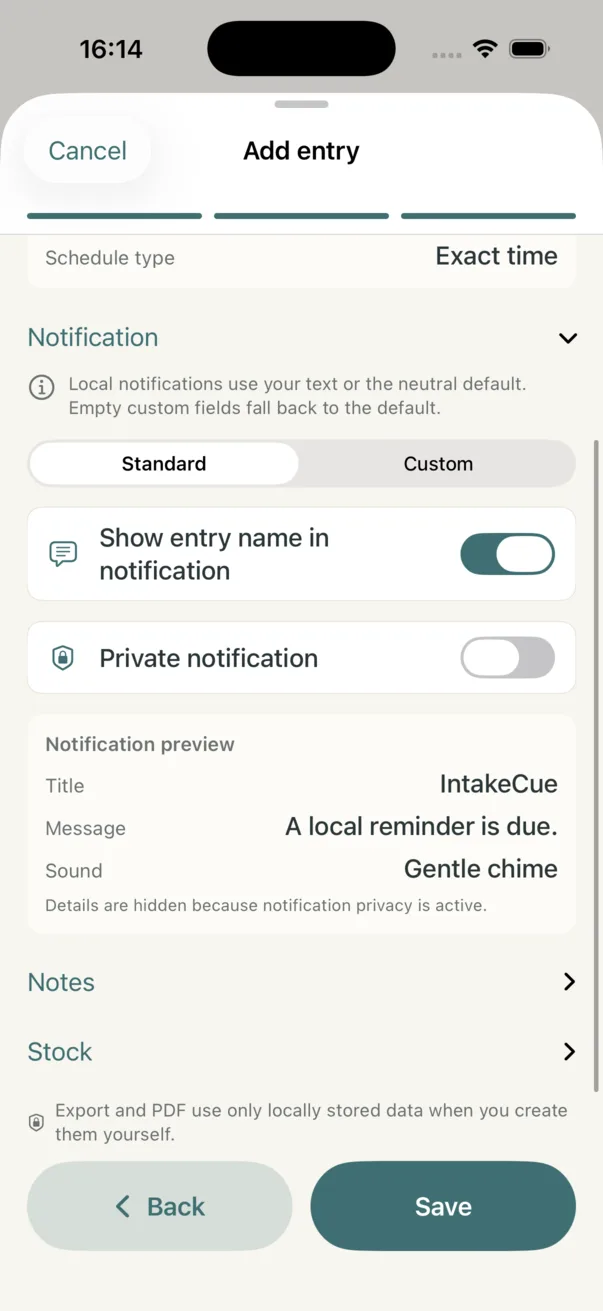
Control notifications privately
Standard or custom alerts, private display and preview stay visible before saving.
Less distraction
Why IntakeCue?
Reminders should reduce mental load, not collect data. IntakeCue combines a clear daily view with flexible notes and keeps your personal entries local on your device.
- For user-entered intakes and routines
- Calm, distraction-free design
- Personal documentation, not medical assessment
Who is it for?
Who is IntakeCue for?
IntakeCue is for people who want to organize their own routines without accepting an account, tracking or developer cloud.
For users who want local reminders without an account, forced cloud sync or tracking.
For people who want to keep notes, history, photos and PDF reports private.
Features
Built around routines that fit your day
Flexible tools for your own routines, without medical promises.
Today overview
See multiple due entries, the next entry and the current status.
Taken, Later and Skip stay easy to reach.Flexible planning
Use fixed times, time windows, day parts, intervals, start date and end date.
Pro supports multiple daily times per entry.Amounts and stock
Record planned and confirmed amounts with units such as tablets, capsules, drops, ml, g or sprays.
Stock is reduced only after a confirmed action.History and observations
Document intakes, skipped or moved entries, symptoms, observations, intensity and notes.
Everything remains personal documentation.Store photos locally
Use photos for entries and for symptoms, complaints and observations.
No cloud and no image analysis.Export and widgets
Create raw data exports, Pro PDF reports and widgets in Small, Medium and Large.
Sharing only happens when you start it.Accessible use
German and English, Light Mode and Dark Mode, Dynamic Type, VoiceOver, local speech output and optional action feedback.
The app adapts better to your use.Deliberate limits
What IntakeCue deliberately does not do
IntakeCue remains a private organization aid. It does not make medical decisions and does not collect usage profiles.
- No medical advice
- No diagnosis
- No dosage calculation
- No pill identification
- No interaction checking
- No replacement for professional medical advice
- No transfer of your entries to developer servers
App scope
What IntakeCue covers day to day
The website describes only functions that match the current app scope.
Today at a glance
- Multiple due entries
- Next entry
- Taken, Later and Skip
- Photos or symbols
- Calm status display
Flexible planning
- Multiple daily times in Pro
- Fixed times and time windows
- Morning, late morning, noon, afternoon, evening, night and all day
- Intervals, start date and end date
- Move to the same or another day
Amounts and stock
- Planned and confirmed amount
- Units such as tablets, capsules, drops, ml, g and sprays
- Simple stock count
- Stock is reduced only after confirmed intake
History and observations
- Taken, skipped and moved entries
- Symptoms, complaints and observations
- Intensity, notes and exact timestamps
- Suspected connection entered by the user
Private and local
- No account
- No tracking and no ads
- No developer cloud
- Local photos, local notifications and local export
- Local widget data through the Apple App Group
Export and control
- Complete JSON raw data export
- German or English
- Past and paused data
- PDF reports as a Pro feature
- Permanently delete local data
Free and Pro
Free and Pro explained fairly
Prices are not set on the website. The actual options appear in the app through Apple.
Free
- Up to 3 active entries
- 1 schedule per entry
- 1 rule per entry
- 1 daily time
- Local reminders, Today and Plan
- Photos, notes, amount, unit and simple stock count
- Basic history and complete raw data export
Pro
- Up to 50 active entries
- Up to 10 schedules per entry
- Up to 20 rules per entry
- Up to 6 daily times
- Advanced recurrences
- Designed PDF reports
- Custom sounds and advanced widget options
Local-first architecture
A local path for your entries
IntakeCue handles your input on your device. Every export and share action starts with you.
User input
Entries created by you
Local storage
Managed on your device
Local notifications
Reminders delivered by iOS
Local PDF export
Selected content as a file
Optional widget snapshot
Local view with Privacy Mode
User-controlled sharing
Only when you choose to share
IntakeCue does not send your entries to developer servers. Device backups and system services depend on your personal Apple and iOS settings.
Privacy by design
Privacy is not an add-on
IntakeCue is designed local-first. Your app content stays on your device and is not transferred to an IntakeCue account or IntakeCue cloud.
Privacy in detailNo account
No registration and no profile.
No cloud
No IntakeCue cloud for your app content.
No tracking
No analytics or advertising tracking.
No ads
No ad networks or personalized advertising.
Local-first
Your entries are managed locally on your device.
Ready for App Review
Contact supportReady for calmer routines?
IntakeCue is being prepared for the App Store. Privacy, support and provider information are already publicly available.
Support, privacy, terms and legal notice are available for review and user questions.
Help
Guides for the core features
Short web guides explain the main workflows without login, forms or tracking.
Add entry
Record your own intakes, supplements or routines.
Create schedule
Structure multiple local reminders.
Add photo
Store a local photo for orientation.
Notifications
Set up iOS notifications consciously.
PDF export
Create a local report from selected content.
Widget
Use a privacy-focused overview.
Pro and restore
Understand purchases and restoration through Apple.
Delete data
Remove local entries deliberately.
FAQ
Frequently asked questions
IntakeCue is a private reminder and note-taking aid, not a medical device. No diagnosis, dosage calculation, pill identification or interaction checking.
Is IntakeCue medical advice?
No. IntakeCue is a private reminder and note-taking aid, not a medical device. It does not replace advice from a qualified healthcare professional.
Does IntakeCue calculate dosages?
No. IntakeCue does not calculate or recommend dosages. Content and schedules are entered by you.
Does IntakeCue check interactions?
No. IntakeCue does not check interactions or identify pills. Ask a qualified healthcare professional about medical questions.
Is my data uploaded?
No. IntakeCue does not transfer your entries, symptoms, observations, notes or photos to developer servers.
Where is my data stored?
Your IntakeCue entries are managed locally on your device. Device backups may depend on your personal system settings.
Do I need an account?
No. IntakeCue works without registration, a profile or an IntakeCue cloud.
Does the app work offline?
Core functions for local entries, local reminders, history and export are designed locally. Purchases, restore and App Store features depend on Apple and network availability.
Does IntakeCue use cloud sync?
No. IntakeCue operates no own cloud for your app content. Device backups or iCloud features depend on your personal Apple and iOS settings.
Are there ads or tracking?
No. The website and app are designed without ads, analytics tracking or ad networks.
How do notifications work?
IntakeCue schedules local iOS notifications for your events. Display and sound depend on iOS settings such as Focus, Silent mode, Lock Screen and notification permissions.
Can I create several reminders per day?
Yes, Pro can support multiple daily times per entry. Free is limited to one daily time per entry.
How does stock counting work?
You can manage amounts and units. Stock is reduced only after a confirmed action, not simply because an item was planned.
Can I export my data?
Yes. Complete JSON raw data export is available to all users. Designed PDF reports are a Pro feature.
What happens to photos?
Photos you add to an entry are only for your own orientation and stay local in your app environment unless your device and backup settings do something else.
What does the widget show?
Depending on size, the widget can show the next entry, name, amount, time or day part, photo or symbol, and open or completed counts. Privacy Mode can make private names more discreet.
What happens after Pro expires?
Pro remains active until the end of the current period. After that, local data is not deleted; up to three entries remain active in Free and additional content may stay visible while paused.
Is my data deleted when Pro expires?
No. An expired subscription does not delete your local data. You can still export content or delete it locally.
How do I cancel my subscription?
Subscriptions are managed through Apple. Open iOS Settings, tap your name, then Subscriptions.
How do I restore purchases?
Use Restore Purchases in the app with the same Apple ID. Offline state or pending purchase may delay the display.
How do I delete all local data?
Use the deletion option in app settings. It requires a multi-step confirmation and cannot be undone from an IntakeCue cloud.
Why might a notification not appear?
iOS can affect notifications through Focus, Silent mode, Lock Screen settings, disabled permissions or technical limits. IntakeCue cannot force display.
Why are detailed guides on the website?
The guides support App Review and user questions without login, contact forms, cookies or tracking.